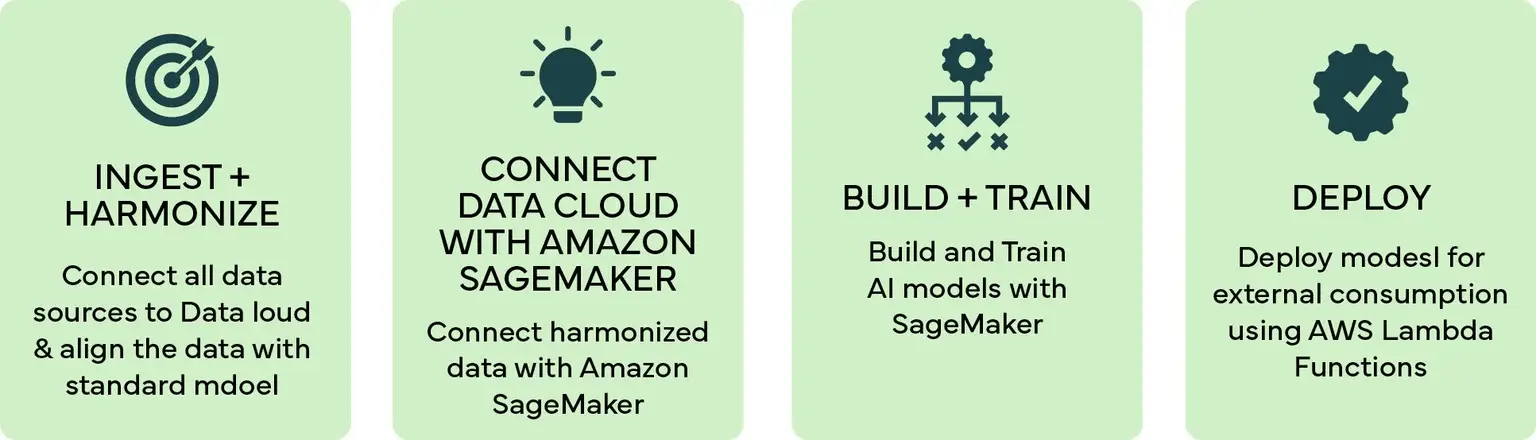
Step 1 - Ingest & Harmonize Data in Data Cloud
The data we needed for AI modeling was gathered from multiple sources into Salesforce Data Cloud where the data was harmonized and synced with objects for consumption by the AI model. For our experiment, we imported customer’s sales data from Sales Cloud, browsing and web engagement data using Interaction Studio, customer’s complaints were imported from Service Cloud and purchase history was brought in from ERP data.
Step 2 - Connect Data Cloud with Amazon SageMaker
While connecting Data Cloud with SageMaker you may encounter a road block inside Data Wrangler as the direct connector is available only in specific regions. So the best way to navigate around it is to improvise and proceed with another route that accesses data from Data Cloud using the Python salesforce-cdp-connector. This is a read-only Data Cloud client for Python and a connection is established with Data Cloud using a connected app inside Salesforce. After the connection was established, data was read with the help of a simple SOQL(Salesforce Object Query Language) query and stored inside a pandas dataframe.
Note: We created the above process by writing Python script inside a notebook instance of Amazon Sagemaker.
Step 3 - Build & Train model
Once we had the data inside a pandas dataframe, the process of data pre-processing was carried out. We covered two possible use cases when the processed data was ready for building & training the models:
- Cross Sell: Product recommendations based on the customer’s prior purchases, web engagement and browsing history
- Churn Prediction: Predicting the probability of a customer’s churn based on the customer’s data related to complaints, purchases, phone calls and engagement.
Use Case 1 - Cross Sell
Our cross-sell model dataset consisted of the following columns: product_id (unique identification for each product), user_id (unique identification for each customer), and rating (out of 5) which told how much the user liked the product.
Most of the users had rated either one or two products only. This is because our dataset contained the ratings of only a single year.
Sagemaker has a plethora of built-in models that can be used for machine learning / AI and for this use case, theKMeansmodel was used and deployed to an endpoint.
Use Case 2 – Churn Prediction
Churn prediction is one of the most important parameters for any organization. Organizations need to understand how many of their customers stay with them and how many will leave. This helps organizations understand the areas of improvement and prevent their customers from leaving.
To build the machine learning model, we used the in-built xgboost algorithm that comes with Sagemaker out of the box. Some of the hyperparameters were defined which were specific to the model we were building. Once we had our model and parameters in place we started the training. After training the model, it was stored in the output path previously defined and the model was saved as a tar.gz file.
Step 4 - Deploy the models
In this step we deployed the SageMaker model to an external API that can be consumed by Salesforce CRM or any application using REST protocol.
The model deployment process involved deployment of the SageMaker models to an endpoint, the created endpoint was then called in Amazon Lambda which contained a single function. The purpose of the function is to take a JSON containing the customer’s data as input and returns the recommended product as a JSON. While the outputs are input and outputs are JSON, the lambda function transforms the request to a model acceptable format and then formats the output back to JSON.
To expose this function to Salesforce CRM and other external apps, a REST API was created in Amazon API Gateway, which was integrated with the lambda function created above. Below are sample outputs for the corss-sell & churn models:
Output - Cross Sell Recommendations
closest clusterinvoking
Output – Churn Probability
Once we deployed the model, an endpoint was created, customer attributes were passed to the model through an API call and it returned the probability of customer’s churn.